We’ve been underestimating Google Flow. After spending two days digging into the platform and mapping all the tools together, it’s clear the vision here is anything but simple.
Flow ships with 34 tools across 4 categories. String them together and you get a complete AI creator pipeline:
Character X-Ray to lock the lead → Scene Explorer to scout locations → Storyboard Studio to plan shots → Transition Machine to handle cuts.
Here’s the framework I use for every tool:
- What problem does it solve?
- What’s its standout capability?
- When should you actually use it?

Let’s get into it.
Flow’s 34 tools break into 4 clearly defined categories:
- 🎨 Image (8 tools): Stylized rendering, multi-angle expansion, and precision editing
- 🎬 Video (10 tools): Transitions, retro filters, text tracking, and dynamic overlays
- 📝 Prompting (5 tools): Character consistency, shot management, and style reverse-engineering
- 🧪 Experimental (11 tools): 360° panoramas, 3D guidance, parallax motion, and creative experiments
Here’s the full breakdown—beginner-friendly and ready to use:
Part 1 — Image Tools (8 tools)

1. Scene Explorer
🎯 Problem it solves: Manually tweaking a prompt to change camera angles usually breaks the lighting and materials in the process. Scene Explorer uses a single location description as a global world anchor, locking the color palette, lighting, and art direction across the entire scene—no more per-shot style drift.
✨ Standout capability:
- Multi-angle consistency: Switch between wide shot, close-up, high angle, and low angle in one click. The angle changes; the atmosphere stays locked.
- Smart prop expansion: AI automatically imagines the props that belong in that location (enter “Chengdu street food alley” and it surfaces ear-cleaning stands, bamboo stools, and hanging cured meats), giving you B-roll assets at the same time.
🎬 Best for: Pre-production storyboarding (package an entire scene’s background asset library in one click), game/concept art, AI mood board base images.
2. Mockup
🎯 Problem it solves: When you composite a cut-out product into a background, the perspective is always off and the light never matches—it looks pasted in.
✨ Standout capability: Intelligent environment mapping and material blending. Upload a product shot or portrait, describe the environment (outdoor billboard, phone screen, minimalist showroom), and AI corrects perspective and ambient light automatically.
🎬 Best for: E-commerce product renders, OOH ad mockups, brand merchandise design proposals.
3. Shot Explorer
🎯 Problem it solves: You’ve got a subject you’re happy with, but switching to a new angle (overhead, extreme low, orbit) causes AI to draw an entirely new object.
✨ Standout capability: Hard-locks the subject’s form and focuses exclusively on camera position. Reframes from a brand-new physical vantage point while preserving the existing subject and structure.
🎬 Best for: 360° product multi-view shoots, character reference sheets from every angle, breaking a hero object into multiple shot sizes.
4. Mask Magic
🎯 Problem it solves: An image is 90% perfect but one small area (a hand, background clutter, clothing color) is wrong, and regenerating destroys the rest.
✨ Standout capability: Semantic segmentation and inpainting. Paint the specific region with your cursor, write a prompt targeting only that area, and every other pixel stays untouched.
🎬 Best for: Cleaning up clutter, swapping outfits or hair color on models, replacing specific details.
5. Simple Sketch
🎯 Problem it solves: You have a clear composition in mind but can’t describe object positions and silhouettes accurately with words alone.
✨ Standout capability: Sketch-to-stylized-image. Doodle a rough layout with the brush, specify an art style, and it converts immediately into a high-style finished image.
🎬 Best for: Rapidly materializing sketch ideas, early-stage composition drafts.
6. Converge
🎯 Problem it solves: The gap between a rough sketch and a high-fidelity realistic render is too wide—standard image-to-image tools tend to freely redraw the underlying structure.
✨ Standout capability: High-fidelity sketch renderer. Closely follows the sketch’s geometry while automatically filling in realistic physical materials, complex shadows, and specular reflections.
🎬 Best for: Industrial/product design sketch rendering, architectural interior perspective-to-render.
7. Image Editor
🎯 Problem it solves: Resizing a canvas, swapping an object, or adding text means bouncing between multiple apps.
✨ Standout capability: All-in-one lightweight image editing. Drag and reposition objects directly on the canvas, smart-expand or reframe the image, and layer typography naturally.
🎬 Best for: Quick social media cover revisions, aspect ratio adaptation, lightweight graphic layouts.
8. Grid Architect
🎯 Problem it solves: Generating images one at a time is slow, and style drift between images is constant.
✨ Standout capability: Matrix-style grid generation. Produce an entire matched set of same-style images in one run, with one-click export of each individual high-resolution tile.
🎬 Best for: Batch production of game icons and UI assets, sticker/emoji series design, multi-state asset libraries.
Part 2 — Video Tools (10 tools)
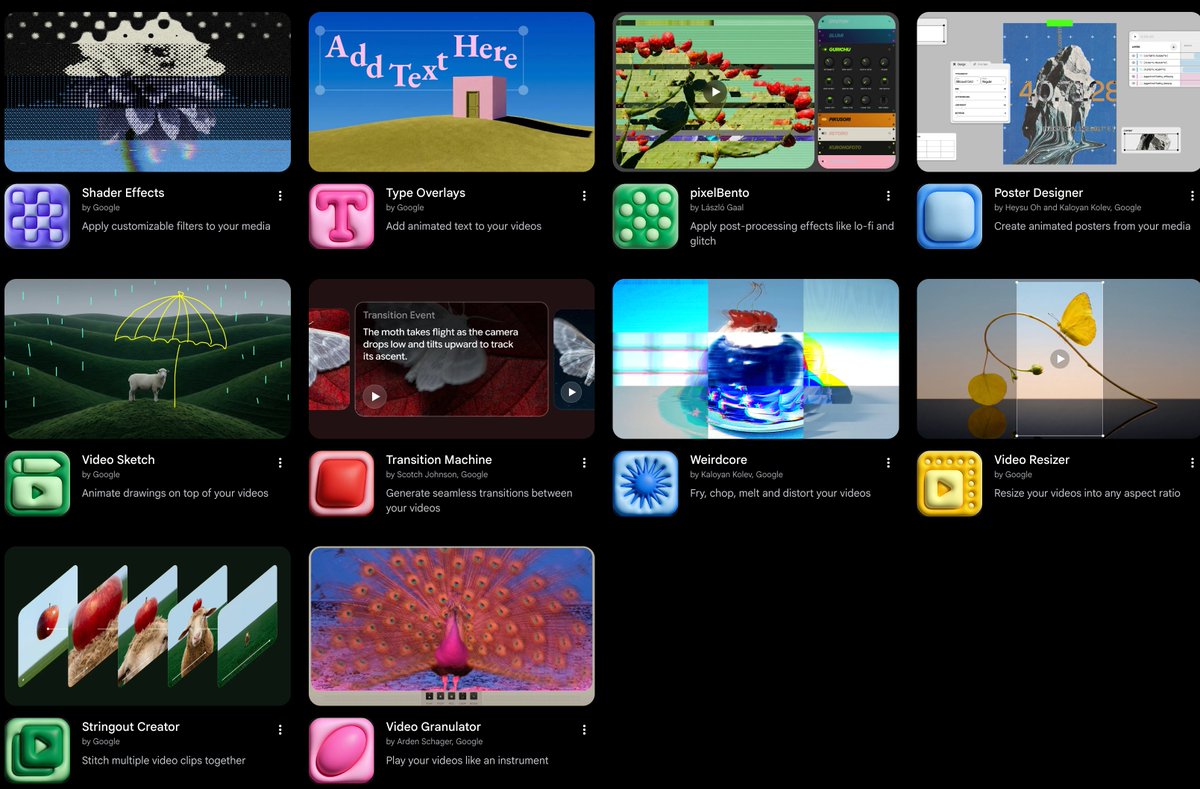
1. Transition Machine
🎯 Problem it solves: Two independently generated video clips hard-cut together look jarring.
✨ Standout capability: AI frame interpolation and seamless morphing between clips. Analyzes the subjects and motion direction in both clips, then generates a smooth physical morph or motion-blur transition.
🎬 Best for: Beat-sync short video transitions, seamless conceptual film cuts, surreal visual transformation shorts.
2. Video Sketch
🎯 Problem it solves: Plain video lacks flair, and adding animated doodles or glowing lines normally requires frame-by-frame hand-drawing.
✨ Standout capability: Animated drawing overlays on video. Draw guide strokes over the footage and the system automatically applies physics-based motion to the brush (glowing outlines, flowing lines, exploding doodles).
🎬 Best for: Sports highlight stroke effects (skateboarding, dance), creative Vlogs, explainer emphasis animations.
3. Type Overlays
🎯 Problem it solves: Adding animated titles or typographic designs to video requires keyframing in a professional editor—time-consuming and technical.
✨ Standout capability: Motion typography generation. Instantly layer designed, rhythmically animated art typography over video.
🎬 Best for: Short video title cards, dynamic trailer typography, fashion film text accents.
4. Pose Text
🎯 Problem it solves: Making text labels follow a moving person or object reliably is difficult—traditional tracking drifts and detaches.
✨ Standout capability: Human pose and motion tracking for text. Text adheres naturally to specific body parts on moving characters like a 3D virtual label.
🎬 Best for: Character stat cards on entry, fitness/sports movement annotation, sci-fi interactive video labels.
5. Shader Effects
🎯 Problem it solves: Standard video filters all look the same and can’t achieve digital-art-level dynamic color textures.
✨ Standout capability: Professional shader filter system. Parametric control over bloom, color mapping, rim lighting, and dynamic light-fluid effects.
🎬 Best for: Electronic music live visual loops (VJ), avant-garde short film color grading, tech atmosphere rendering.
6. pixelBento
🎯 Problem it solves: Retro game or glitch-art aesthetics are hard to achieve convincingly by hand.
✨ Standout capability: Retro pixel and Lo-Fi glitch generator. One click downgrades modern HD video to CRT scanlines, pixel grain, or signal-noise retro texture.
🎬 Best for: Cyberpunk short film post-processing, 8-bit/16-bit game-feel video production, vaporwave art.
7. Poster Designer
🎯 Problem it solves: You have a pile of video clips but no fast way to turn them into a promotional motion poster.
✨ Standout capability: One-click video-to-motion-poster. Extracts the most expressive dynamic frames, intelligently composites layers, border, and title layout.
🎬 Best for: Event key-visual motion campaigns, film/short premiere posters, music album animated covers.
8. Weirdcore
🎯 Problem it solves: Creating Dreamcore or Weirdcore-style distorted visuals has no off-the-shelf algorithm in standard tools.
✨ Standout capability: Image melting, slicing, tearing, and surreal distortion. Simulates the deconstructive visual breakdown of a surrealist dreamscape.
🎬 Best for: Avant-garde fashion films, stream-of-consciousness shorts, niche art-style MVs.
9. Video Resizer
🎯 Problem it solves: Cropping landscape video to portrait short-form cuts the subject out of frame and leaves black bars.
✨ Standout capability: Intelligent adaptive reframing. Lossless conversion between any ratio (16:9, 9:16, 1:1, etc.) with automatic face detection and visual gravity rebalancing.
🎬 Best for: Multi-platform distribution (YouTube landscape → TikTok/Reels/Shorts portrait).
10. Stringout Creator
🎯 Problem it solves: Downloading and importing dozens of clips into an editor to arrange a timeline is tedious.
✨ Standout capability: Cloud-based rough-cut assembler. String multiple video segments into a complete rough-cut timeline track directly on the Flow canvas in narrative order.
🎬 Best for: Quick shot-list-to-rough-cut preview, multi-clip rough cut review, fast asset organization.
(Note: Video Granulator also lets you granularly control video playback like a musical instrument in real time.)
Part 3 — Prompting Tools (5 tools)
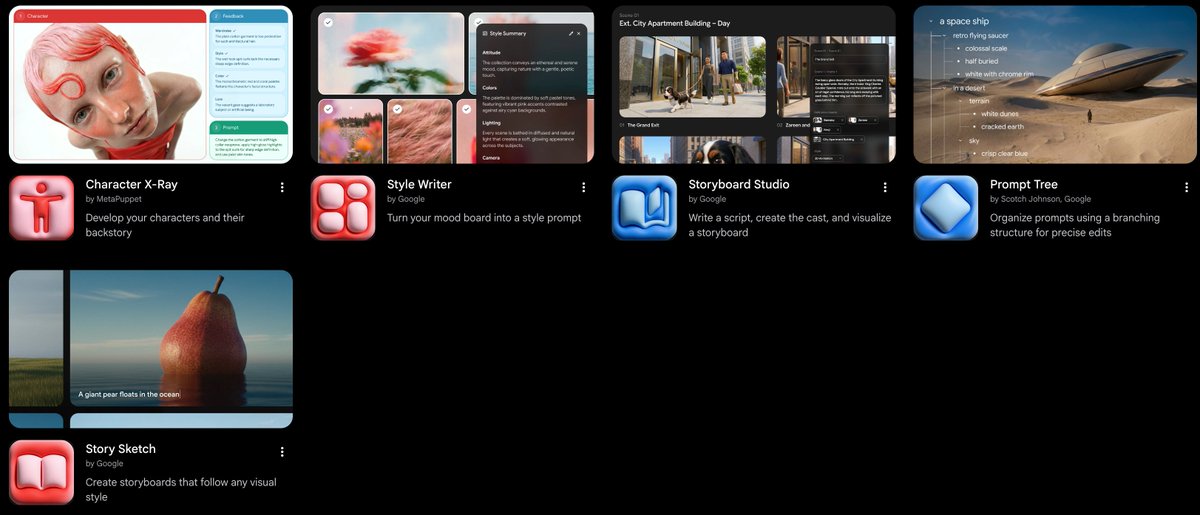
1. Storyboard Studio
🎯 Problem it solves: In coherent narrative short film production, script, characters, and shot images are completely disconnected—each lives in a different tool.
✨ Standout capability: Script breakdown → character setup → batch storyboard visualization in one interface. Manage character sheets, story beats, and corresponding shot images in the same workspace.
🎬 Best for: End-to-end AI short film production, commercial script dynamic pitches, novel and manga visualization.
2. Character X-Ray
🎯 Problem it solves: AI-generated characters “change faces” the moment you tweak the prompt—the lead has entirely different features.
✨ Standout capability: Deep decomposition of a character’s skeletal structure, facial features, costume details, and backstory into a high-consistency model sheet.
🎬 Best for: Building principal character assets for long-form narrative, multi-pose character design for animation, virtual IP development.
3. Style Writer
🎯 Problem it solves: You’ve found a stunning moodboard image but don’t know what vocabulary to use to reproduce that look with AI.
✨ Standout capability: Style parameter extraction from image. Upload a reference; AI reverse-engineers its color temperature, lighting type, camera body, focal length, and other professional prompt components.
🎬 Best for: Building a personal visual style library, mimicking premium film/cinematic photography aesthetics, prompt reverse engineering.
4. Prompt Tree
🎯 Problem it solves: After iterating on a prompt, you realize the previous version was better—or you’ve got so many branches you’ve lost track of which is which.
✨ Standout capability: Branching version management like Git. Clearly records every micro-adjustment and its corresponding output; branch or roll back at any point.
🎬 Best for: Precision tuning of complex commercial prompts, collaborative team prompt exploration, Prompt A/B testing.
5. Story Sketch
🎯 Problem it solves: You need to present a full narrative concept to a team quickly, but it’s not time for a polished final cut yet.
✨ Standout capability: Visually unified sketch storyboard generation. Rapidly produces a set of clean, stylistically consistent director’s storyboard line drawings.
🎬 Best for: Director pitch decks, cinematography composition discussions, fast narrative validation.
Part 4 — Experimental Tools (11 tools)

1. Scout360
🎯 Problem it solves: A flat 2D image can’t convey spatial immersion; VR and 3D backgrounds need real depth.
✨ Standout capability: Expands a single image into a full 360° equirectangular panorama that you can freely rotate and explore in 3D space.
🎬 Best for: VR panoramic space exploration, 3D game environment skybox generation, immersive scene concept previews.
2. 3D Model Visualizer
🎯 Problem it solves: AI image generation is unreliable with complex geometric perspective—buildings and mechanical structures come out distorted.
✨ Standout capability: Import a basic 3D geometric white model as a physical spatial skeleton; AI layers on realistic materials, lighting, and detail.
🎬 Best for: Architectural interior rendering, industrial product structure visualization, precision perspective concept illustration.
3. DepthWarp 4D
🎯 Problem it solves: Converting a static image to video usually produces a simple zoom or stretch—no real parallax from genuine camera movement.
✨ Standout capability: Extracts a depth map and simulates real 3D physical camera movement: near objects move fast, distant backgrounds move slow, creating genuine parallax depth.
🎬 Best for: Animating archival photos in 3D, creating immersive push-in camera moves from landscape stills, spatial parallax effects.
4. 3D Face Swap
🎯 Problem it solves: Traditional 2D face swaps break as soon as the head turns or the angle gets wide.
✨ Standout capability: 3D facial mesh reconstruction enables seamless face replacement on virtual characters at wide angles and in dynamic motion.
🎬 Best for: Virtual character digital doubles, short drama character face replacement, conceptual makeup experimentation.
5. Datamosh
🎯 Problem it solves: Glitch-art short films made with conventional filters look fake—there’s no real compressed-data-corruption texture.
✨ Standout capability: Removes I-frames from video to simulate authentic digital video compression damage: subjects and scenes bleed and tear together in surreal pixel flows.
🎬 Best for: Avant-garde visual MVs, fashion-forward brand films, glitch-art experimental footage.
6. Webcam Set
🎯 Problem it solves: Without a professional green screen, compositing real people into AI-generated virtual backgrounds rarely looks natural.
✨ Standout capability: Real-time webcam keying and light blending. Sit at your computer and instantly “appear” inside a generated conceptual environment.
🎬 Best for: Concept scene real-time interactive demos, simple green-screen virtual streamer setups, creative Vlog production.
7. Whisk
🎯 Problem it solves: “Put character A into style B inside environment C” is nearly impossible to describe accurately in text.
✨ Standout capability: Multi-reference image prompt blending. Specify separate reference images for subject, style, and scene; AI hybridizes them into a brand-new visual.
🎬 Best for: Inspiration collision and ideation, cross-style character mashups, fast concept art synthesis.
8. Frame Deconstructor
🎯 Problem it solves: Video is a flat stream through time—it lacks sculptural spatial presence.
✨ Standout capability: Expands each frame of a video or GIF horizontally or vertically through 3D space, creating a three-dimensional “time sculpture.”
🎬 Best for: New media digital art installations, creative visual-slice posters, temporal dimension motion visualization.
9. Blob Tracking
🎯 Problem it solves: Adding sci-fi tracking effects to moving objects requires complex 3D tracking and particle systems.
✨ Standout capability: Futuristic dynamic color-blob tracking. Automatically captures the fluid trajectory of moving objects and generates cyberpunk color-blob motion effects.
🎬 Best for: Sci-fi short film UI VFX, sports/streetwear highlight reels, mechanical-feel data visualization.
10. Ribbit
🎯 Problem it solves: Beat-syncing video to music requires manually cutting frame by frame against the audio waveform.
✨ Standout capability: Audio beat-driven video. Import a music track; AI automatically triggers video cuts and speed ramps on every kick and accent in real time.
🎬 Best for: Electronic music beat-sync shorts, music visualization performances, fast-paced rhythm rough cuts.
Next up: I’m going to test each one of these tools hands-on and post demos with actual results. Stay tuned.

