Lately a lot of bloggers have been recommending an open-source project: Audiblez.
It turns EPUB ebooks into M4B audiobooks, entirely on your machine.
My first thought when I saw it:
If AI can turn an ebook into an audiobook end to end, how hard will that hit traditional voice work?
Then I installed it, ran it once, and realized things are messier than the demos suggest.
What does Audiblez actually solve?
Using it is straightforward.
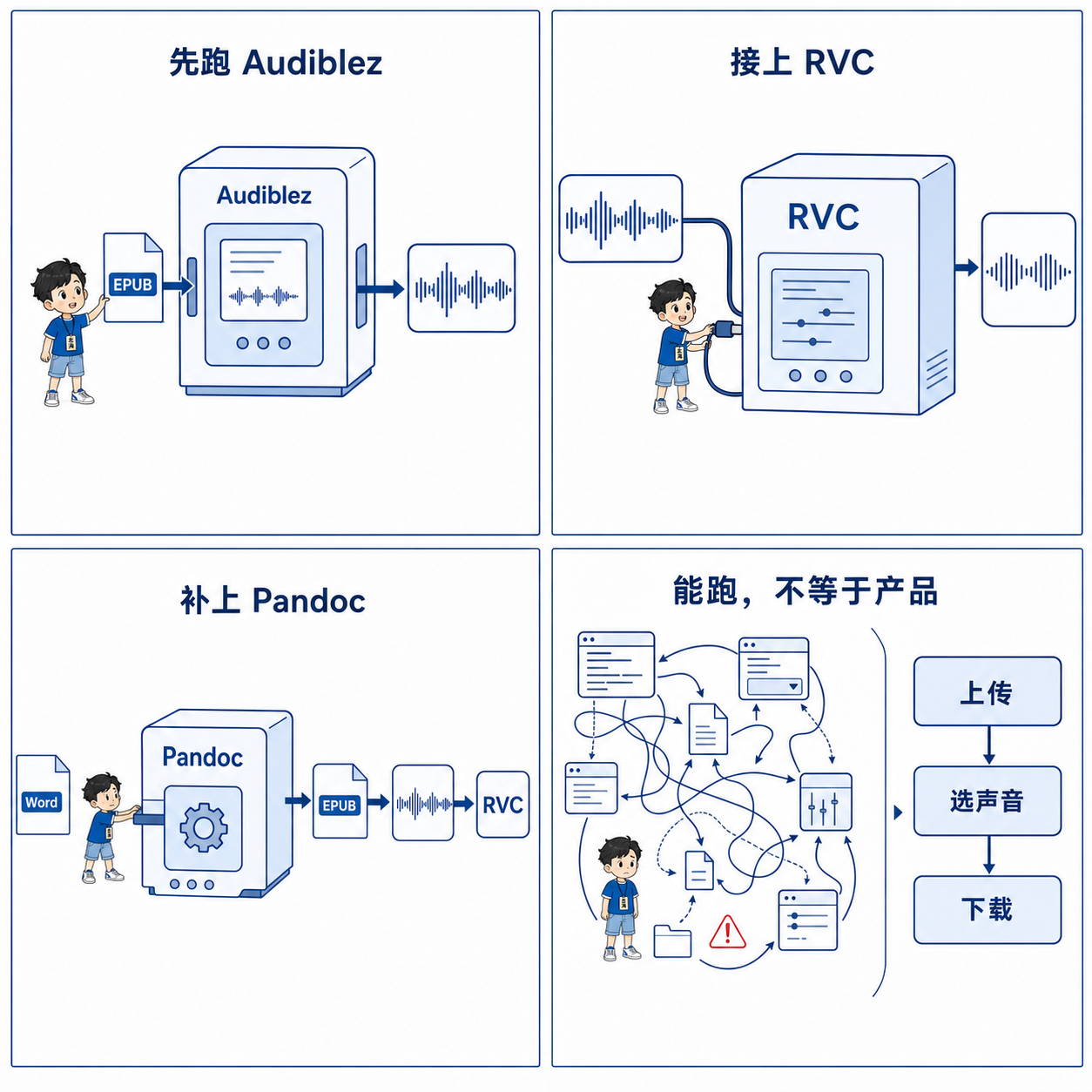
Give it an EPUB. It pulls the text, runs a TTS model, and packs the result into an M4B you can play in an audiobook app.
What it solves:
How do you turn an ebook into something you can listen to, quickly?
And it stays local—no uploading documents to a third-party platform.
That matters for novels, course materials, and internal company docs.
There is one obvious limit:
The voice is whatever the TTS model gives you.
It is already listenable. Getting a more distinctive voice—or your own voice—is not so easy.
Can you swap that audio into another voice?
That question led me to RVC.
RVC is not text-to-speech.
It cannot read a book, and it cannot turn text into speech by itself.
It is closer to voice conversion:
Take audio that already exists, and reshape it into a target timbre.
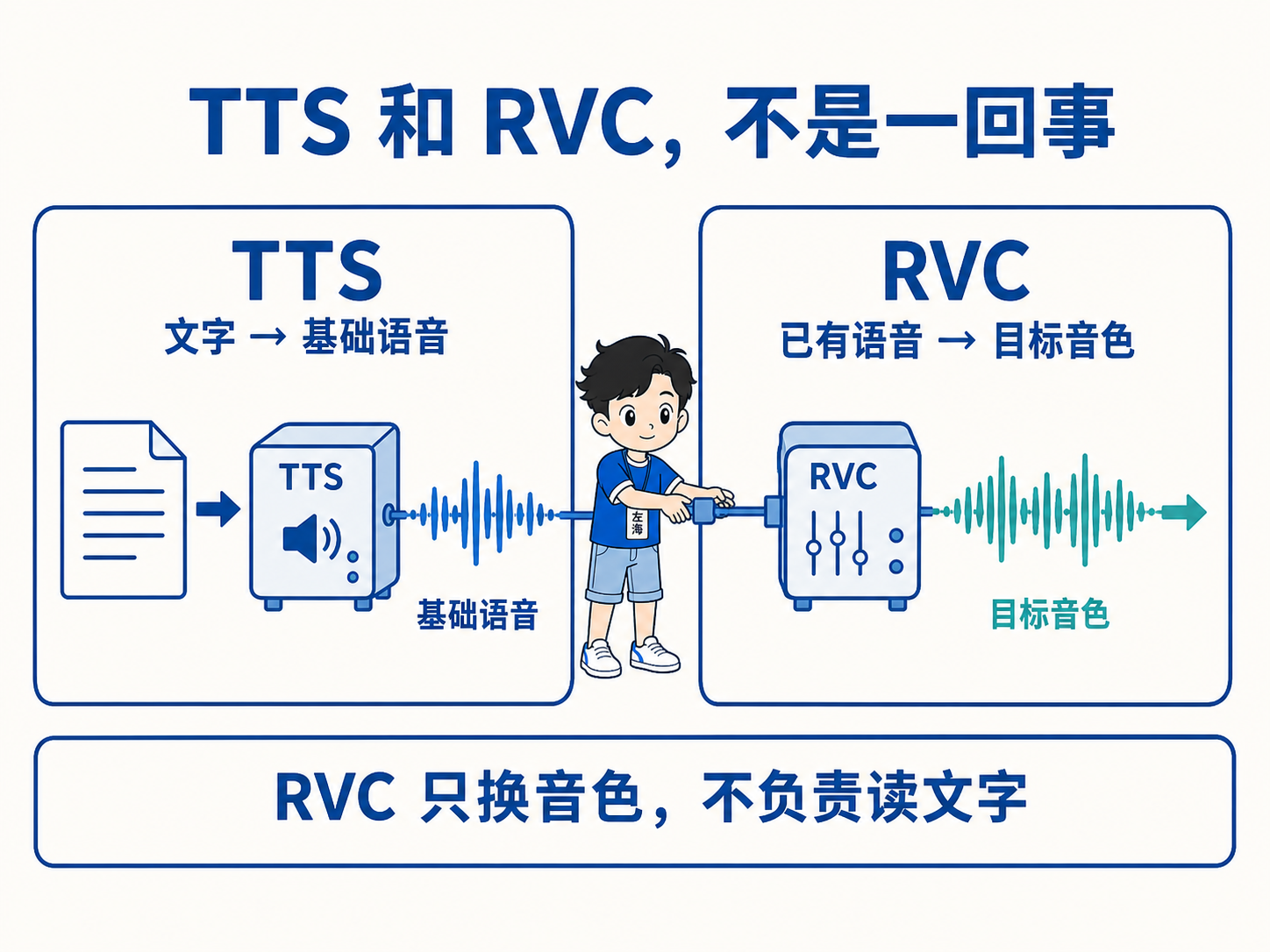
So the first chain became:
Ebook
↓
Audiblez generates plain narration
↓
RVC converts to the target voice
↓
Export a new audiobook
I tested with a short passage.
Audiblez produced a base male voice; RVC converted it. I ended up with playable WAV and M4B files.
Then I tried a longer text—close to 4,000 characters—and got a full clip of about six minutes.
At that point the technical path worked.
Most people don’t have an EPUB
Thinking one step further, another real-world problem showed up.
Audiblez wants EPUB.
What people actually have is usually:
- Word
- TXT
- Markdown
- Web articles
- Internal company documents
You cannot ask ordinary users to learn how to make an ebook before they can make audio.
So you need a conversion layer in front.
I settled on Pandoc.
Pandoc can turn Word, TXT, Markdown, HTML, and other common formats into EPUB, then hand that off to Audiblez.
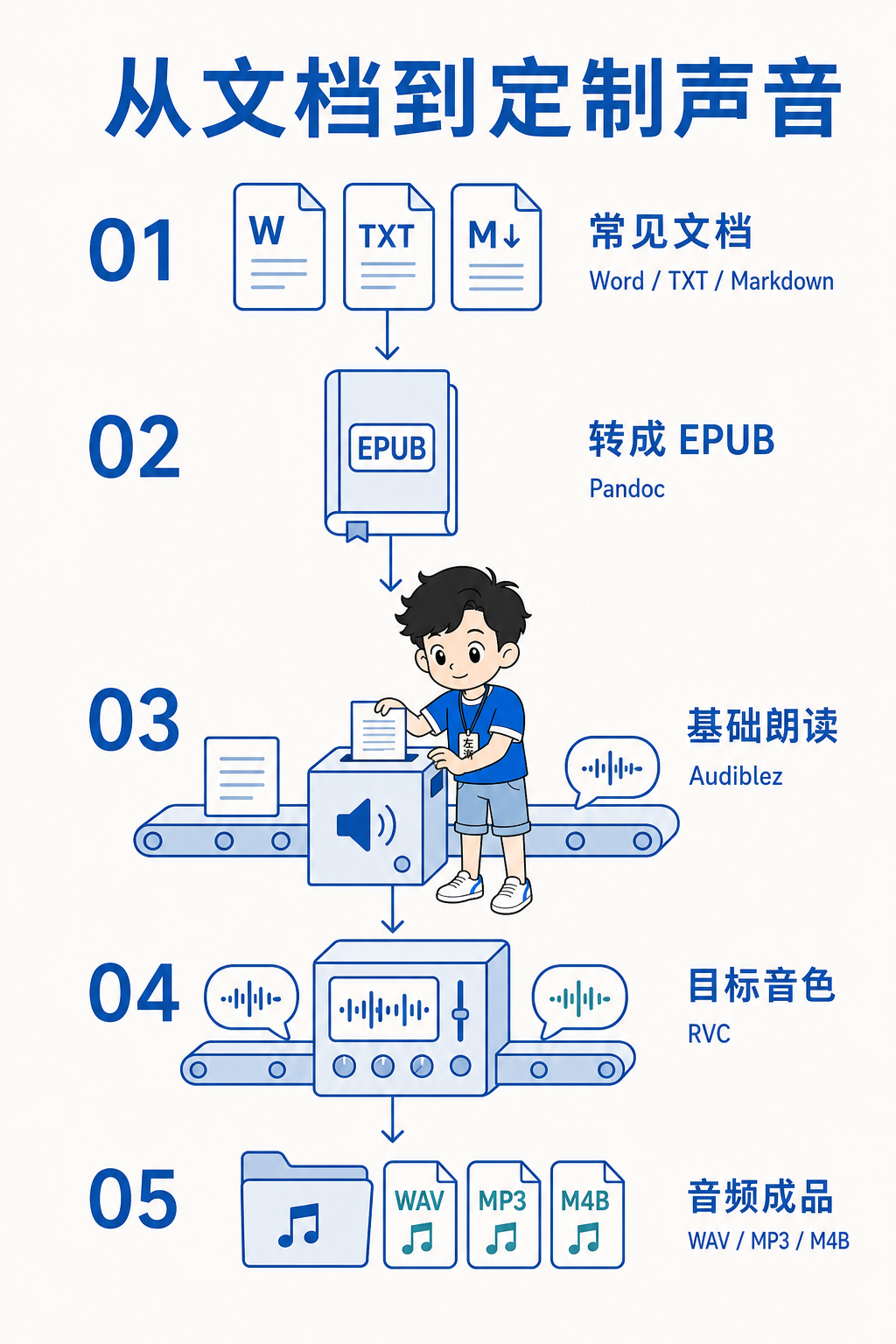
The full chain ends up like this:
Word, TXT, Markdown, etc.
↓
Pandoc → standard EPUB
↓
Audiblez → base narration
↓
RVC → target voice
↓
Export WAV, MP3, or M4B
Three open-source projects can now go from ordinary documents to finished audio in a chosen voice.
Three projects running is not a product
After I got each piece working, a point that is easy to ignore became obvious:
A working technical chain is still just a demo.
It is a long way from something ordinary people can use.
Today the workflow is still messy:
Convert files yourself, run commands, copy audio around, pick models, tweak parameters.
If one step fails, you may have to redo everything before it.
A real product should not require users to understand Pandoc, EPUB, TTS, RVC, FFmpeg, or model indexes.
Users should only do three things:
- Upload a document
- Pick a language and a voice
- Download the finished audio
Everything else should be automatic.
For example:
Upload a Word file
↓
System detects chapters and body text
↓
Strip headers, footers, page numbers, and content that should not be read aloud
↓
Generate speech per chapter
↓
Convert into an authorized target voice
↓
Produce an audiobook with cover, chapters, and resume playback
That is a product—not three open-source tools glued together.
What real problems could it solve?
A few practical cases come to mind.
1. Creators making audio content
Writers often have piles of articles and ebooks, and no time to record each one.
This kind of system can turn existing writing into audio for podcasts, audiobook platforms, or membership libraries.
2. Publishing in your own voice
With the person’s consent, creators can train a voice model of themselves.
New articles or courses no longer need a full re-recording every time—you can generate audio close to their real voice.
3. Internal company materials as audio
Training decks, product manuals, and knowledge bases can become something people listen to on the commute.
For material that must not leave the company, local processing matters even more.
4. Accessibility and reading support
People with vision issues, reading difficulties, or no spare screen time can turn documents into something easier to hear.
5. Long articles and course packs
Many of us save PDFs, Word files, and long posts we never get around to reading.
As audio, they fit driving, walking, or chores.
Will it replace voice actors?
My current take: not in the short term.
AI can already handle basic narration, and the cost will keep falling.
A lot of low-cost work that only needs “read this out” may gradually move to AI.
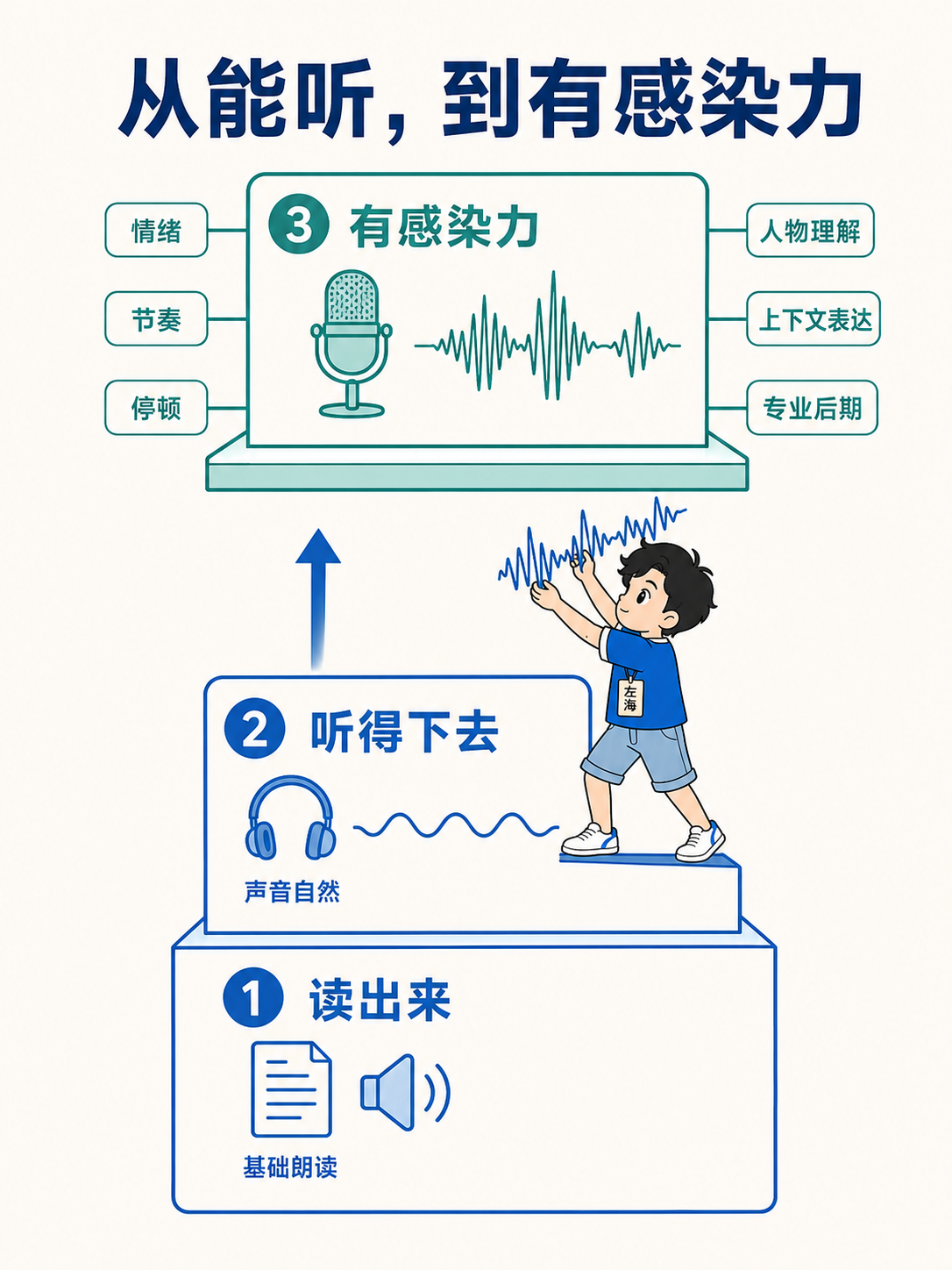
But strong voice performance is more than sounding similar. It includes:
- Emotion
- Rhythm
- Pauses
- Character understanding
- Context-aware delivery
- Professional post-production
Turning an article into something you can listen to is not hard anymore.
Turning it into something people willingly listen to for hours still is.
So it is more likely to replace mechanical reading first—not professional voice work.
Voice cloning has obvious risks too
The easier the tech gets, the more carefully you need the boundaries.
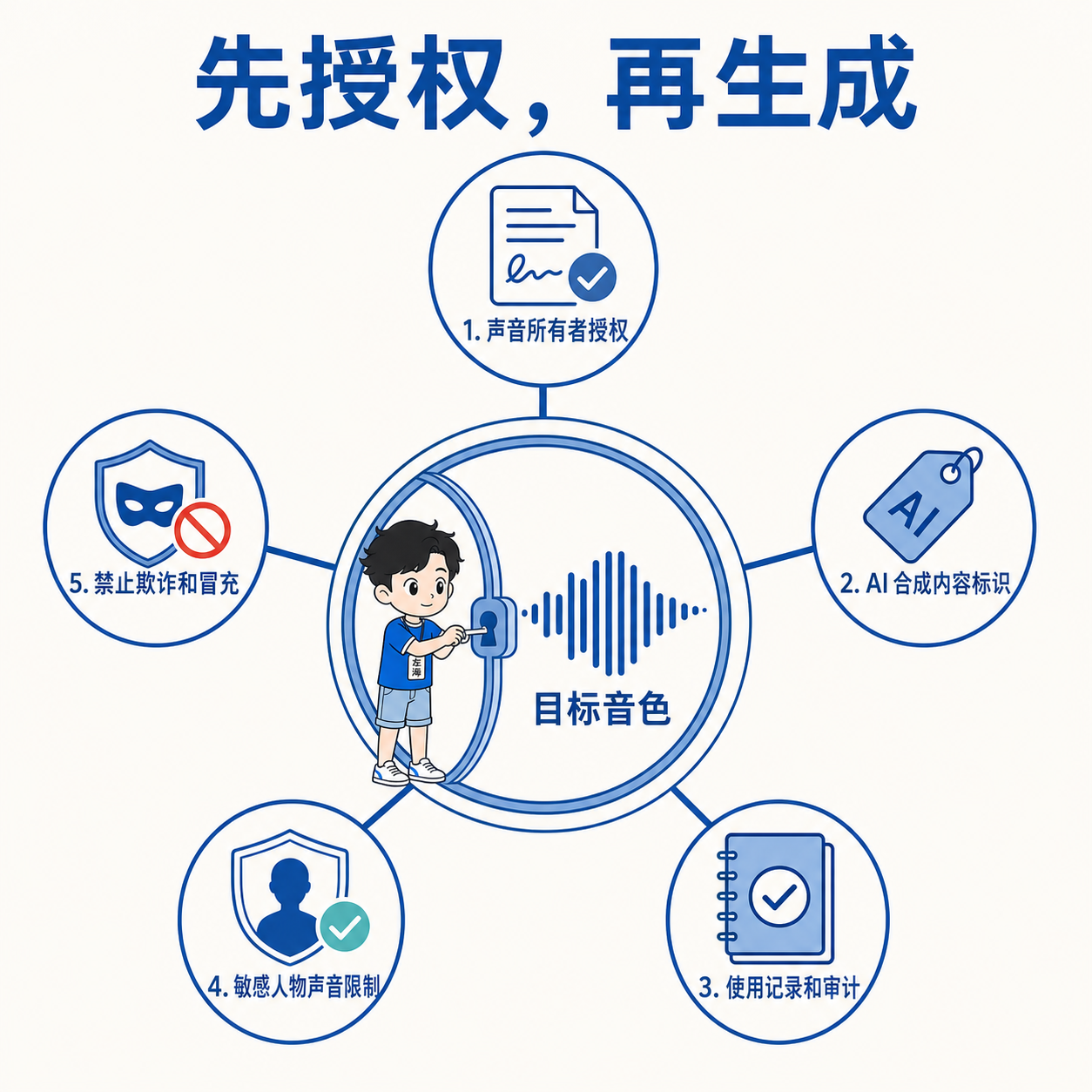
Cloning a real person or a public figure without consent can feed fraud, fake marketing, and misleading content.
If you productize this, you at least need:
- Consent from the voice owner
- Labels for AI-generated audio
- Usage logs and audit trails
- Limits on sensitive or high-risk voices
- Bans on fraud and impersonation
Being able to build it does not make every use legitimate.
Where am I now?
I have separately verified:
- Ordinary documents → EPUB
- EPUB → base narration
- Base audio → target voice
- WAV and M4B export
- Short text
- Multi-minute longer text
So the core technical path works.
To become something you could actually ship to users, you still need:
- A unified web UI
- A background job queue
- Progress reporting
- Retries on failure
- Document cleanup
- Chapter management
- Model and voice management
- Permissions, security, and audit
A more honest status today:
Technical feasibility is proven. User demand and business model are not.
One last question
As an engineer, it is easy to get hooked on “this pipeline somehow works.”
Building it does not mean anyone needs it.
So I want to know:
In what situation would you turn a Word file, PDF, article, or ebook into audio?
What matters more to you:
- Conversion speed
- Natural-sounding voice
- Using your own voice
- Document privacy
- Price
- Or you simply don’t need this at all?
The three open-source projects:
At this stage, what I need to validate is no longer whether the tech can run—it is whether anyone actually wants a unified content system like this.